
Value source types
Every field mapping has a source type that controls where the placeholder's value comes from. Pick the type from the Source buttons inside each mapping row.
Field
Replaces the placeholder with a single file-matter field value. A transform (currency, date, phone, etc.) can be applied on top. Use for straightforward 1-to-1 substitutions: a name, a date, an amount.
Multiple fields
Select Field, then click + Add another field after this one. Each field is concatenated with a separator of your choice (space, comma, dash, newline, or pipe), chosen at the start of the row it joins to. Fields can come from different data objects — see the Data reference page. For example, <summary> combining a property field and a general field:

123 Main Street - $850,000.00
Joined list
Formats every item in an array (Buyers, Guarantors, Disbursements, etc.) and joins the results into a single placeholder value. Two inputs control the output:
- Field and Then: the sub-fields to combine for each item, with their own separators between fields. For example: Full Name + dash + Client Type + space + Email.
- Join with: what goes between complete item blocks. For example a semicolon, a comma, or a new line.
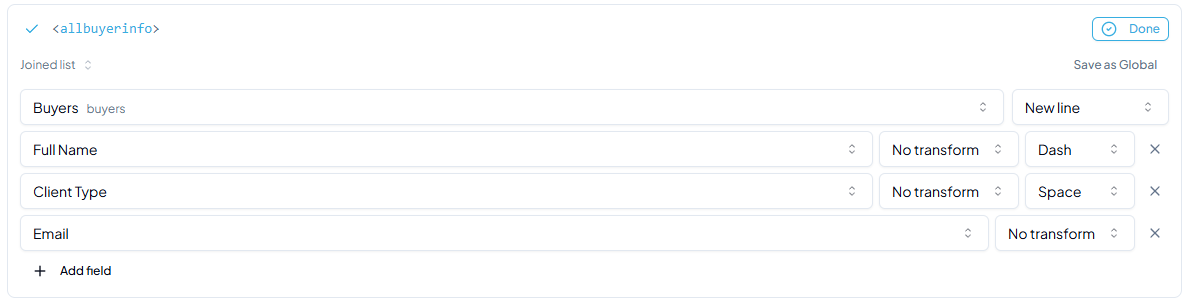
Output:
John Smith - Individual john@email.com
ABC Company - Company info@abc.com
Jane Doe - Individual jane@email.com
Use Joined list when you need a formatted summary of all items in a list inside a single placeholder, without a repeating loop section.
Default value
A hardcoded string that is the same every time the document is generated. Use it for boilerplate that has no corresponding data field: a standard label, a fixed clause, or a phrase that rarely changes.
Ask when generating
No value stored in the mapping. A box appears in the generate window and the person generating fills it in. The answer is remembered on the file, so the next generation is prefilled. Use it for details that cannot be read from the file: a case-specific note, a custom instruction.
To offer a fixed set of answers instead of a text box, open the row and choose Offer a list instead. The generate window then shows a pick-one, and the words chosen are the words that print. A condition can read the pick: a section rule may name the placeholder as its subject, so a passage prints only for one of the answers. Tick Allow a custom answer under the options and the list becomes an offer rather than a closed set — the generate window adds an Other… entry with a box beneath it, for the file none of the answers fits.

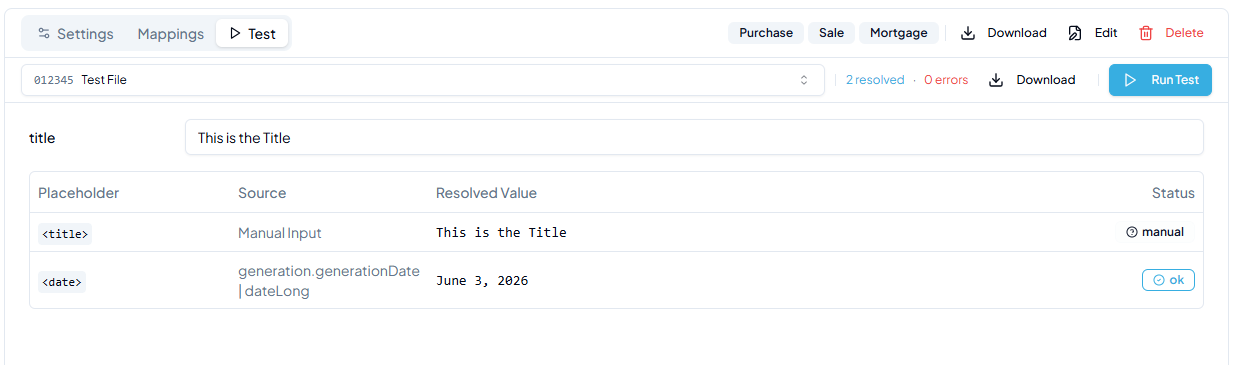
When testing or generating, the input prompt appears inline:
Signature block
Replaces the placeholder with a whole block of signature lines — one cell per signer, laid out in columns. The placeholder is named by you, like any other:
{Client Signatures}Give it a line of its own — it becomes a whole table, so it cannot share a line with other text. If it does share one, the mapping is refused and names the tag, rather than the problem surfacing when someone generates the document.
The field picker carries one entry per signing party, and choosing one settles both questions at once: that this is a signature block, and who signs it. Signatures of Clients follows the file type and is the one to reach for; Buyers, Sellers, Borrowers, Guarantors and Lenders name one party outright.
Who signs and how each signer is worded are covered in Field mappings.
Expression
An evaluated formula. Use when the output depends on logic that can't be expressed as a single field or concatenation.
Syntax reference
| Pattern | Example | What it does |
|---|---|---|
| Concatenation | firstName + " " + lastName | Joins multiple values into one string. |
| If / else | isCompany ? "Corporation" : "Individual" | Returns the first value if the condition is true, otherwise the second. |
| If / else if | type == "A" ? "Option A" : type == "B" ? "Option B" : "Other" | Chains multiple conditions, returning the first match. |
| Pipe transform | completionDate|dateLong | Applies a named transform to format the value. |
| Fallback | email ? email : "N/A" | Uses the field value if it exists, otherwise falls back to a default. |
| Array index | buyers[0].givenName + " " + buyers[0].lastName | Reads a field from a specific item in a list by position (0 = first). |
| Comparison | amount > 0 ? amount|currency : "None" | Compares a value and returns different output based on the result. |
| Optional index | buyers[3] ? buyers[3].givenName : "" | Checks whether a list item at a given position exists before using it. |
| Negation | !general.isPurchaseFile | Inverts a boolean field. Useful for conditionals that should fire when a condition is false. |
Supported operators: == != > < >= <= && || !
Available transforms
Transforms are applied using the pipe character: value|transformName.
| Name | Input | Output | Example |
|---|---|---|---|
| currency | Number | CAD formatted amount | feeAmount|currency → "$1,234.56" |
| date | Date | YYYY-MM-DD | completionDate|date → "2026-06-01" |
| dateLong | Date | Month DD, YYYY | completionDate|dateLong → "June 1, 2026" |
| boolean | Boolean | Yes / No | isCompany|boolean → "Yes" |
| lowercase | String | All lowercase | clientType|lowercase → "individual" |
| uppercase | String | All uppercase | clientType|uppercase → "INDIVIDUAL" |
| initials | String | First letter of each word; punctuation and digits are skipped | responsiblePersonName|initials → "AW" |
| phone | String | Phone number | phoneNumber|phone |
The same transforms are available in Field and Multiple fields source types via the transform dropdown. For a full list of objects, arrays, and field names you can reference in expressions, see the Data reference page.