
Transformations and styling
Format placeholder output with transformations (currency, date, phone) configured in the mapping UI, and apply bold, italic, or colour directly in Word.
Transformations
Transformations format a placeholder's value at generation time: currency formatting, date display, case conversion, and more. They are configured in the mapping UI, not in Word. Leave the placeholder token plain and pick the transformation from the dropdown when setting up the mapping.
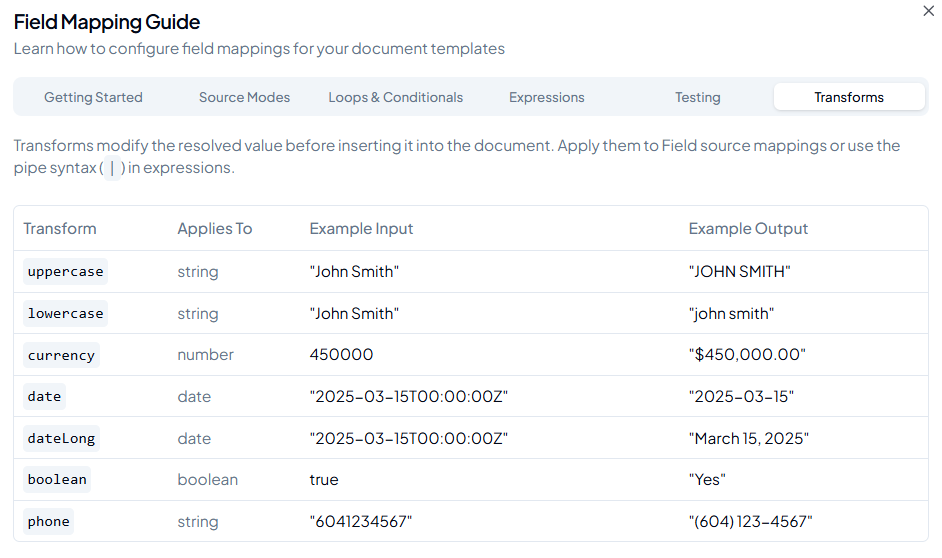
- The transforms reference table is also available inside the app via the help icon on the Templates page.
Automatic transform suggestions
When you pick a field in the mapping UI, the system automatically suggests a transform based on that field's data type, so you do not have to set it manually:
- Number fields (amounts, fees, balances) get Currency (CAD) pre-selected.
- Date fields (completion date, adjustment date, etc.) get Date (Long Format) pre-selected.
- Phone fields get Phone pre-selected.
The suggestion only applies when no transform is already set. It will not overwrite a choice you've already made. You can change or clear it from the transform dropdown at any time.
Applying styles to values
Apply the style directly to the placeholder token in Word before uploading. The engine carries the style through and applies it to whatever value gets substituted in.
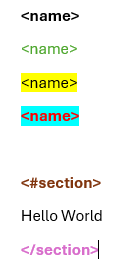
The generated document reflects each style on the resolved value:
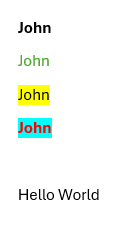
- Bold, italic, font colour, highlight, and underline all transfer from the placeholder token to the output value.
- Styles applied to section placeholders (
<#section>/</section>) are ignored. Section tags produce no output of their own.
Avoid mixed styles on one placeholder
Applying more than one style to different characters within the same placeholder token will produce unpredictable output styling. Keep the entire placeholder token in a single, consistent style.
Combining transformations and styling
Transformations and in-Word styling are independent and can be combined. Apply a transformation in the UI and bold the placeholder in Word to get bold formatted output.